Virtual Staging for Real Estate: How Many Rooms Should You Actually Stage?
An empty three-bedroom house might give you 20 photos that could be virtually staged. That doesn't mean all 20 should be. Stage too little and buyers may still struggle to read the empty spaces. Stage everything and the listing starts to feel more like a furniture catalog than a property.
With virtual staging for real estate, we'd rather choose the rooms where furniture answers a useful question.
- How big is this living room once a sofa is in it?
- Can the spare room hold a bed?
- Is that awkward corner actually usable?
Sometimes four staged images can do more work than fourteen.
Start with the rooms buyers may struggle to read
An empty room can be surprisingly difficult to judge from a photograph. Without a bed, sofa or dining table for scale, buyers have fewer familiar objects to help them understand how the space might work. That doesn't mean every empty room needs furniture added.
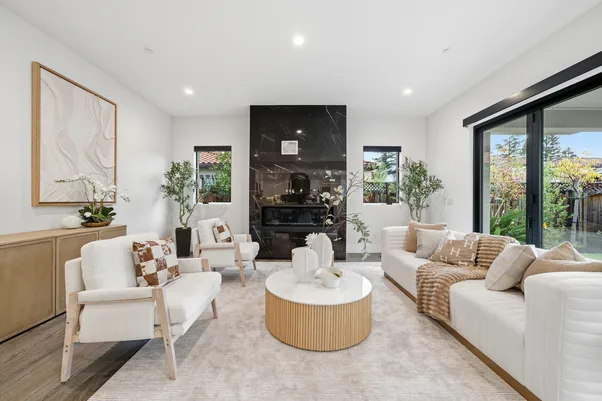
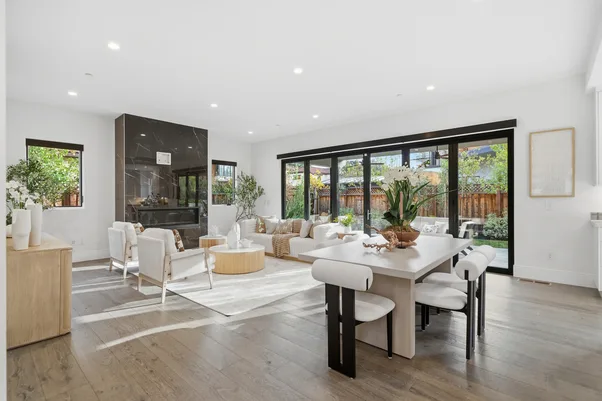
We'd start with spaces where staging makes the purpose or scale easier to understand. The main living room is an obvious candidate. An empty primary bedroom may benefit too. If there's an open-plan area where the living and dining zones aren't immediately clear, staging can help separate them visually.
A small utility room probably doesn't need the same treatment.
The question we ask is: does adding furniture explain something? If it doesn't, leave the photo alone.
Don't stage five versions of the same room
We’ve already looked at how virtual staging is changing the way empty properties are presented. The more practical question here is how much staging a single listing actually needs. This is an easy place to overdo it. A photographer may have four angles of the living room. Virtually staging every angle doesn't necessarily give the buyer four times as much information. One or two may be enough.
That also matters when using virtual staging for real estate tools. AutoHDR currently notes that its virtual staging feature doesn't maintain identical furniture across multiple angles of the same room. If several views are staged separately, the furniture can differ between them.
So we'd be selective.
- Empty main living area: High
- Primary bedroom with no scale reference: High
- Open-plan space that's hard to read: Consider staging
- Second angle of an already clear room: Usually unnecessary
- Utility or storage space: Usually leave unstaged
The exact number will change from one property to another. That's fine. There doesn't need to be a fixed quota.
Stage the photo that explains the room best
Choosing the room is only half the decision. You also need the right photograph. Suppose the living room has five listing photos. One shows the fireplace well but cuts off half the floor. Another captures almost the entire room and shows its relationship with the dining area. We'd probably stage the second one.
Furniture works better when the photograph gives it enough room to explain scale and use. A cramped angle can leave the staged furniture looking squeezed in, even when the actual room isn't small.
This is also why we'd finish the core photo edit first. Correct the exposure and perspective. Make sure the room itself looks right. Then decide whether staging adds anything.
At AutoHDR, virtual staging sits alongside the rest of the editing workflow, so we can work from an already edited property image rather than treating staging as a separate starting point.
Give unstaged photos a job too
There's no reason the whole gallery needs the same treatment. In fact, keeping some original empty-room images can be useful. Buyers can see the space without furniture and compare it with the staged interpretation.
That becomes particularly relevant as rules around altered listing imagery get stricter. CRMLS, for example, requires digitally altered listing images to be identified and displayed immediately before or after the original image. Its guidance includes adding or changing furniture among the types of alterations covered by the rule.
Local MLS rules vary, so photographers and agents need to check the requirements that apply to the listing. From our side, the broader principle is simpler: virtual staging for real estate should help someone understand an empty property without making the staged version look like its current condition.
More staging isn't automatically better
We don't think there's a magic number that works for every listing. A small apartment might need two staged rooms. A larger vacant house could justify several more. What matters is whether each staged image adds something the previous one didn't.
At AutoHDR, we'd rather use staging where it earns its place. Start with the rooms buyers may find difficult to picture, choose the strongest angle and keep the result believable.
That's a better use of virtual staging for real estate than filling every empty photograph with furniture simply because the software can. Want to see how virtual staging fits into an existing property-photo workflow? AutoHDR lets you apply virtual staging to edited listing images without starting the photo process again.
FAQs
Should every empty room be virtually staged?
No. Prioritize rooms where furniture helps buyers understand scale, purpose or how the space could be used.
Can I virtually stage several angles of one room?
Yes. You can, but check furniture consistency between images. Some AI staging systems may generate different furniture for separate angles.
Should the original empty-room photo stay in the listing?
Check your MLS rules. Some MLSs require the original image to appear alongside a digitally altered version.