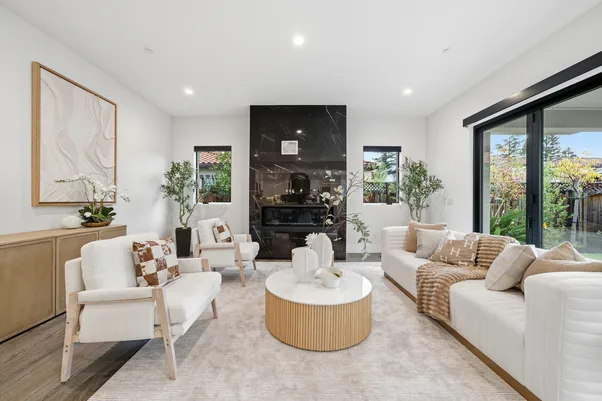
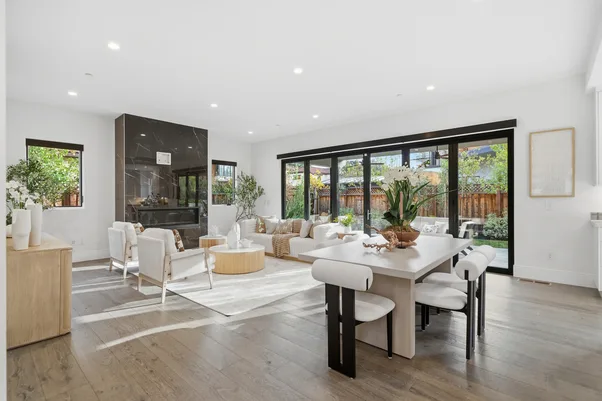
Real Estate Declutter Before Photography: What Should Be Removed Before the Camera Comes Out?

A photographer can remove a surprising amount from a property photo after the shoot. That doesn't mean everything should wait until then.
A pile of mail on the kitchen counter is easy to move before the camera comes out. So is a laundry basket in the hallway. Moving those things takes a minute. Fixing them across several photos later can take much longer.
That's why “real estate declutter” should start before photography, not inside the editing software. At AutoHDR, we use AI to handle certain distractions after a shoot, but we still prefer a clean starting image whenever possible.
What should be removed before the shoot?
Start with things that are personal, temporary or simply distracting.
Before photographing a property, we'd look for:
- Mail, paperwork and personal photographs
- Loose cables and chargers
- Laundry and bins
- Pet toys, bowls and accessories
- Unnecessary countertop items
- Small appliances that aren't needed
- Anything that makes a room look busier than it really is
There's a simple reason to deal with these things first.
One object can appear in several photographs. A pile of toys might show up in four living-room angles. A basket in the hallway could appear every time the photographer turns toward that part of the house. Move it once and you're done.
What can wait until editing?
Some distractions aren't practical to remove before the shoot. A neighbor's bin might be visible through a window. A small object may be missed during preparation. Something that looked insignificant from behind the camera can become obvious once the final images are on a larger screen. That's where real estate declutter tools have a place.
Our AutoHDR Declutter tool uses AI to remove clutter and unwanted objects from listing photos. It can be selected when uploading a shoot or applied later to already-processed photos.
We'd use it for the small distractions that make sense to remove digitally, rather than treating it as a substitute for preparing the property.
Don't remove something just because it looks messy
This part takes judgment. A lamp might look unnecessary in one photograph but actually be a permanent fixture. A chair could seem like clutter while also helping show how the room is used. Décor may be intentional and worth keeping.
AutoHDR's own guidance points out that Declutter can sometimes remove items such as lamps, chairs or decorative pieces because the AI classifies them as clutter. So after applying real estate declutter, check the result. Look at the room again.
- Did the software remove something that belongs there?
- Did it alter a fixture?
- Does the edited photo still represent the room accurately?
If something important disappeared, turn Declutter off for that shoot or restore the item rather than accepting the edit simply because the room looks cleaner.
Know what should never be hidden
There's a difference between removing a distraction and changing the property. A loose cable is one thing. Removing a built-in feature, changing the layout or hiding a property defect is another. We'd keep the original photograph available while reviewing every significant removal. That makes it easier to compare the edited version with what the camera actually captured.
This is also why we don't recommend automatically cleaning every object from every image. The purpose of real estate declutter is to reduce visual noise. It isn't to create an empty version of the property. The room should still look like the room.
A cleaner shoot means less editing later
Physical preparation and AI editing work well together. Before the photographer starts, remove the obvious distractions. Once the photos are processed, use AI for the things that were missed or couldn't reasonably be moved.
At AutoHDR, Declutter can be applied automatically during processing, or used on individual images afterward. That gives photographers a choice.
If a particular shoot needs very little cleanup, leave it off. If a property has lots of small distractions, apply it and review the results. We'd rather make that decision per property than assume every listing needs the same treatment.
The goal is a cleaner photo, not a different property
Good real estate declutter should make a photograph easier to read. That's it. Remove the laundry basket. Clear the paperwork. Fix the small distractions that survived the shoot. Then check the image before it reaches the listing.
At AutoHDR, we built Declutter to take some of that repetitive cleanup off the photographer's plate, while still leaving the final decision with the person who knows the property. Prepare what you can before the camera comes out. Use AI where it saves real work. And always look at the finished image before calling it done.
FAQs
What should be removed before real estate photography?
Remove personal items, loose cables, laundry, bins, pet items and unnecessary objects that distract from the room.
Can AI declutter real estate photos?
Yes. AutoHDR's Declutter tool can automatically remove clutter and unwanted objects from listing photos.
Can AI remove something I wanted to keep?
Yes. Declutter can occasionally remove fixtures or décor, so review edited images before publishing.