Real Estate Photography Apps: What Should Photographers Check Before Choosing One?
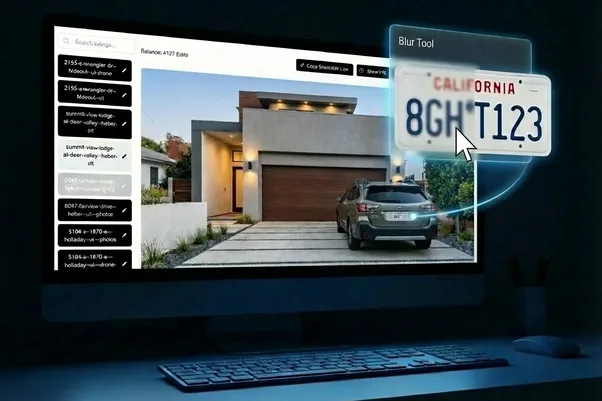
A real estate photography app can look great in a demo. Upload a few photos. Click a button. Done. The real test starts when you have 40 images from a busy Saturday, several properties waiting for delivery and a client asking for one photo to be fixed before lunch. That's when the small details matter.
We'd look at how the app handles uploads, editing, revisions and delivery before worrying about how impressive the interface looks.
Does it work with the way you already shoot?
Can your team use it?
What happens when one image needs a second edit?
At AutoHDR, we've built our own workflow around those practical questions.
Start with the upload process
A photography app needs to fit into the way you already work. If you shoot bracketed interiors, for example, the app should be able to recognize the different exposures without making you sort every file manually. AutoHDR can detect and group bracketed images automatically, while photographers can upload directly through a browser.
Before choosing any real estate photography app, we'd check:
- How many images can you upload at once?
- Does it accept your usual file types?
- Can it handle bracketed sets?
- Can you upload from your phone or desktop?
- Does it require separate software?
That last point is easy to overlook. If you have to change your entire workflow just to get the photos into the app, the convenience can disappear pretty quickly.
Look beyond the first edit
Getting the first version back is only part of the job.
- What happens when the sky looks wrong?
- A lamp disappears?
- One room needs a different color treatment?
Those situations are where a real estate photography app earns its place.
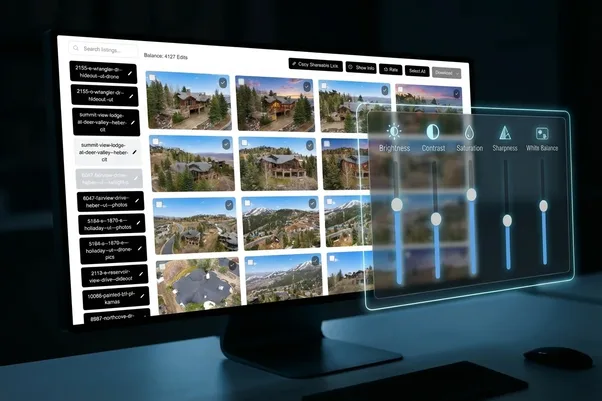
We'd look for tools that let you make targeted changes without sending the entire shoot through the editing process again. AutoHDR, for example, offers AI Re-edit for specific changes, along with AutoRemove and AutoFill for individual areas of an image.
That's useful because most shoots don't need every photo changed. One image might be perfect. Another needs five seconds of attention. The app should let you tell the difference.
Check how it handles your team
A solo photographer has different requirements from a company processing dozens of shoots each week. If several people touch the same jobs, check whether the platform supports shared accounts, permissions or a common credit pool.
At AutoHDR, we currently support team accounts, allowing team members to access shared listings and credits from the same account. For larger operations, integrations matter too.
We support connections with platforms including Aryeo, Spiro, Tonomo, HD Photo Hub and Dropbox. There is also an API for teams that need a custom workflow. We'd put those questions fairly high on the list. An app that produces good edits but doesn't fit your existing systems can create another problem instead of solving one.
Don't ignore delivery
Editing is only one part of the job. Once the images are ready, you need to get them to the person who ordered them. That could mean downloading a batch, sharing a gallery or sending the images into another platform.
AutoHDR lets users share a listing through a browser link, so clients or agents can view and download photos without having an AutoHDR account. That kind of detail may not look exciting during a demo. It matters when you're delivering 20 properties in a week.
Check the pricing against your actual workload
Don't compare apps using the headline monthly price alone. Work out what you actually process.
- Cost per photo: Shows the real editing expense
- Monthly volume: Helps compare plans fairly
- Extra AI edits: Unexpected usage can add cost
- Team access: Important for larger operations
- Integrations: May remove other software or manual steps
AutoHDR currently offers monthly plans, yearly billing and pay-as-you-go credit options, so the right setup depends on how much you process. We'd test the workflow with real jobs before committing. A demo shoot is useful. A busy Tuesday is better.
Choose the app that fits the work
The right real estate photography app isn't necessarily the one with the longest feature list. *We'd ask a more boring question: Will this make the work easier on an ordinary week?
Look at the upload process. Test the editing controls. Try fixing a difficult image. Check team access and integrations. Then see how the finished photos get back to the client.
At AutoHDR, those are the parts of the workflow we care about because they're the parts photographers actually deal with after the camera is packed away. The app should fit the job. Not the other way around.
FAQs
What should I look for in a real estate photography app?
Check uploads, editing controls, revisions, integrations, team features, delivery options and pricing against your actual photo volume.
Can a real estate photography app handle bracketed photos?
Yes, some can. AutoHDR automatically detects and groups multiple exposures of the same angle.
Do real estate photography apps work with other platforms?
Yes, some offer integrations or APIs. AutoHDR currently supports platforms including Aryeo, Spiro, Tonomo, HD Photo Hub and Dropbox.